Schematic and PCB Design
Articles 1 and 2 covered the fundamentals and the component selection. This article turns those decisions into actual hardware: translating the component list into a schematic, and then translating the schematic into a physical PCB that can be manufactured and assembled.
Board Distribution
The first layout question was whether to put everything on one board or split it across multiple boards. A single board would have been simpler in some ways, but it would have created a fundamental problem: putting the AFE, the most noise-sensitive part of the entire system, right next to the ESP32, one of the noisiest components. A microcontroller running at high clock speeds with an active radio generates switching noise that can easily bleed into nearby analog circuitry.
Splitting the design across three physically separate boards solved this. The EEG board handles everything analog and sits isolated from anything digital. The compute board carries the ESP32 (microcontroller), battery charging, and its own regulation. The HRV board handles the MAX30102 and LSM6DSO with their own power supplies. Each board does one job, and the analog section stays physically far from the RF and digital sections.
The tradeoff is the interconnect. Signals have to travel between boards using flexible wires routed along the device's structure. The SPI bus between the EEG board and compute board ends up being the longest run, but running the SPI clock at a conservative frequency keeps this manageable.
Component Map Per Board
EEG Board
Everything on this board exists to support one function: capturing clean EEG signals from the scalp. It contains the ADS1299 analog front-end with 8 electrode connections, the TLV757P33 regulator for the ADS1299's digital side, the TLV70025 for the positive +2.5 V analog supply, the LM2664 charge pump inverter generating the negative supply, and the TPS72325 regulating that to −2.5 V. Solder pads connect the eight electrodes and provide points where the inter-board wires attach.
Compute Board
This board is the central hub. It contains the ESP32-S3-MINI-1 microcontroller, the TLV757P33 regulator for the 3.3 V rail, and the MCP73831 battery charging IC. The board manages power distribution, handles BLE communication, and reads all three sensor streams.
HRV Board
This board carries the two secondary sensors: the MAX30102 for heart rate measurement and the LSM6DSO IMU. It has its own regulation – the TLV757P33 for the shared 3.3 V rail and the TLV757P18 for the MAX30102's 1.8 V logic supply.
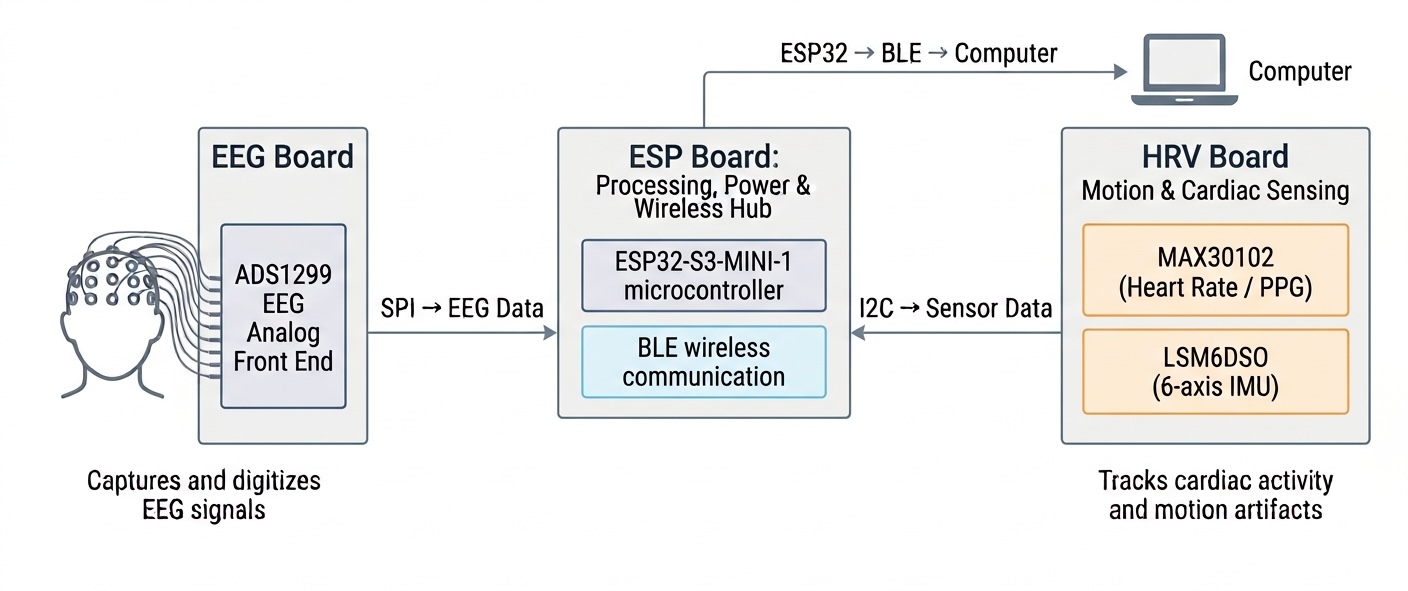
System architecture: Three boards (EEG Board, Compute Board, HRV Board) with signal flow.
Schematic Walkthrough
With the three boards defined, here's how they actually connect.
Signal Buses
The EEG board communicates with the compute board over SPI – a dedicated, high-speed connection that carries digitized EEG data from the ADS1299 to the ESP32. SPI was chosen for throughput: streaming multiple EEG channels at high sample rates continuously needs more bandwidth than I2C can deliver.
The HRV board communicates with the compute board over I2C – a shared, two-wire bus that both the MAX30102 and LSM6DSO sit on. Each sensor has its own address, so the ESP32 can talk to each one independently without needing separate wires.
Power Flow
Power enters through USB at 5 V and charges a lithium battery using the MCP73831. During normal operation, the battery supplies 3.7 V to each board's local regulators. Each board generates its own supply rails rather than sharing a regulated bus from the compute board. This keeps the noisier regulation activity local to where it happens and lets each board be independently powered during debugging if needed.
The Full Signal Path
End to end: electrodes on the scalp → ADS1299 (amplification, filtering, digitization) → SPI → ESP32 → BLE → computer.
The IMU and HR data follow the same last hop: I2C → ESP32 → BLE, running alongside the EEG stream.
PCB Layout
Layer Stack-Up
The board uses a 4-layer stack. With multiple power rails, mixed analog and digital signals, and the need for a solid ground reference throughout, 4 layers was the practical minimum. 2-layer boards for mixed-signal designs tend to involve routing compromises that show up as noise problems later.
The layers are:
- Layer 1 (top) – components and primary signal routing
- Layer 2 – dedicated ground plane, unbroken across the board
- Layer 3 – power pours (3.3 V, +2.5 V, −2.5 V)
- Layer 4 (bottom) – crossover signals that couldn't route on Layer 1
Keeping Layer 2 as a solid, unbroken ground plane is the most important design choice. It gives every signal a direct, low-impedance return path, which matters enormously when the signal being measured is only a few microvolts. Ground plane continuity is what makes the measurement possible.
Decoupling Capacitors
Every IC on the board has decoupling capacitors placed directly at its power supply pins. A decoupling capacitor acts as a small local energy reservoir. When an IC suddenly demands more current than the supply rail can deliver instantaneously, the capacitor supplies it, preventing the supply voltage from drooping and creating noise that other components can see.
The placement matters as much as the value: a decoupling capacitor placed across the board from its IC has to wait for current to travel through inductance in the PCB traces before it can respond, which defeats the purpose. Right next to the pin is where it needs to be.
Trace Routing
Traces were kept as short as possible, especially in the analog section where shorter traces mean less inductance, less antenna area for noise pickup, and cleaner signal behavior. The reference layout was followed closely for the AFE section.
The inter-board connection is the exception. Because the boards are physically separate and positioned at different points, the SPI signals travel over flexible wire running roughly around the device's perimeter. A long, uncontrolled wire has more capacitance and picks up more noise than a short PCB trace would. Running the SPI clock at a conservative frequency helps manage this – the lower the clock speed, the more forgiving a long run becomes.
Component Footprints
Resistors and capacitors use 0201 footprints wherever possible. These are too small to place reliably by hand, but a pick-and-place machine handles them without difficulty. The result is a meaningfully smaller board footprint, which matters for a device that has to fit into a compact physical structure.
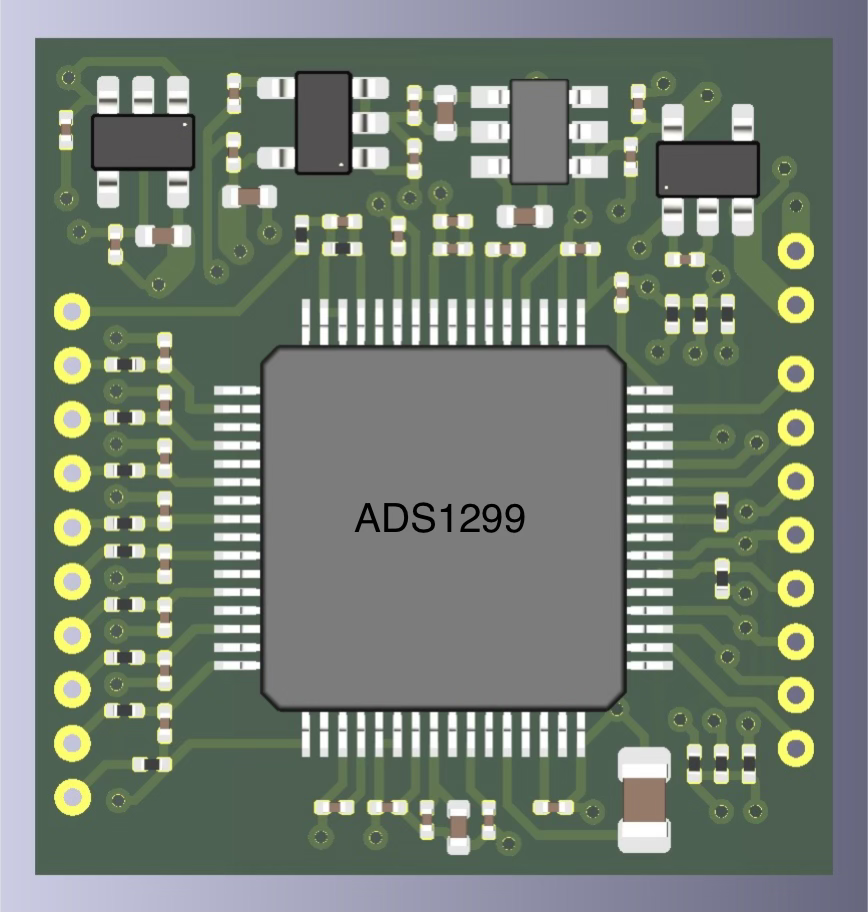
EEG Board: ADS1299 analog front-end with electrode connections and isolated power supplies.
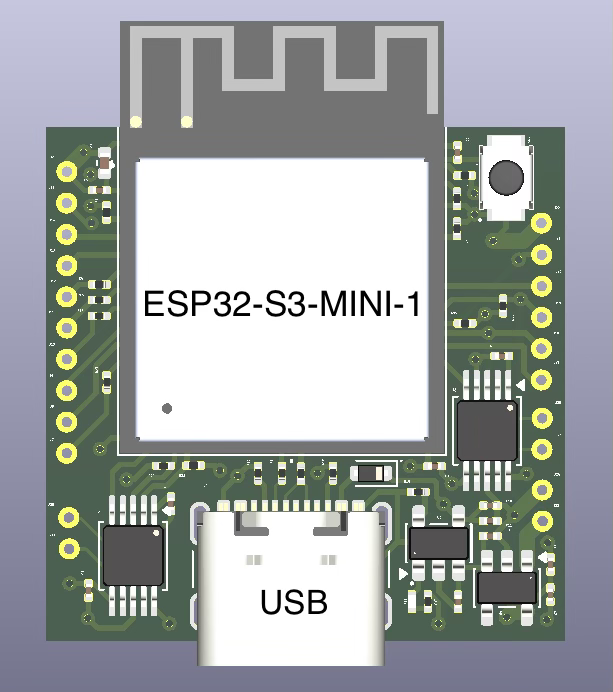
Compute Board: ESP32-S3-MINI-1 microcontroller with battery charging and main 3.3 V regulation.
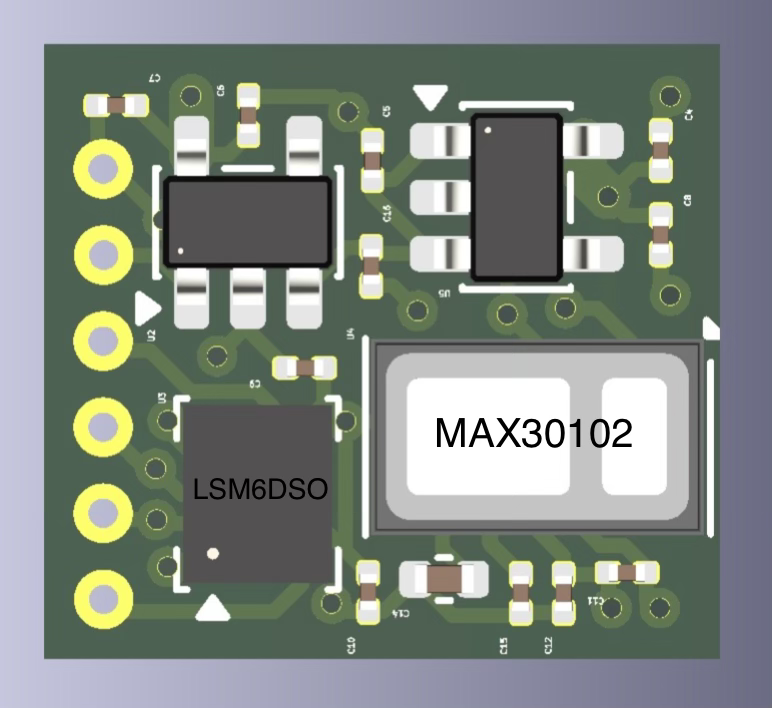
HRV Board: MAX30102 heart rate sensor and LSM6DSO 6-axis IMU with dedicated power supplies.
The Spin History
Spin 1 – What Broke
The first board was hand-soldered with 0402 and 0805 footprints. Two things didn't work: the power architecture was built around a single 5 V supply that the board wasn't generating correctly, and the I2C bus had shorted somewhere – the secondary sensors weren't responding. Two weeks of debugging couldn't isolate either issue cleanly. When a board has multiple simultaneous failures, debugging becomes genuinely difficult because fixing one thing doesn't tell you whether the board works.
Spin 2 – What Changed
The power architecture switched to the ±2.5 V bipolar supply the AFE actually performs best on. The I2C issue was fixed as well. More importantly, hand-soldering was replaced with PCBA. The upfront cost was higher, but the time saved and the reduction in assembly-related faults made it worthwhile. For a board with this many small components, PCBA is cost-effective in any realistic accounting of time and effort.
Spin 3 – Refinement
The microcontroller switched to a smaller module, reducing the compute board's footprint significantly. Component footprints moved to 0201 across the board. Board separation was refined based on lessons from Spin 2. The interconnect uses flexible wire soldered to dedicated pads – compact, practical, and a meaningful space saving over a connector-based solution.
Key Takeaways
- PCBA from the start would have saved significant time. Hand-soldering a dense board is itself a source of faults. The debugging time on Spin 1 far exceeded what PCBA would have cost.
- Read the datasheet's recommended operating conditions before layout. The Spin 1 power issue was in the schematic before it reached the PCB. A careful read beforehand would have caught it.
- Multiple simultaneous failures are hard to debug. Isolating issues by bringing up one part at a time helps.
- Reference layouts exist for good reason. Following the AFE's reference layout closely in Spin 2 and Spin 3 removed an entire class of analog layout uncertainty. For a first-time analog PCB design, the reference layout is the right starting point.
- Run DRC before fabrication. Design Rule Checks catch clearance violations and unconnected nets that are easy to miss visually.
- Verify component symbols, footprints, and 3D models before ordering. A small footprint mismatch can mean paying for another board.